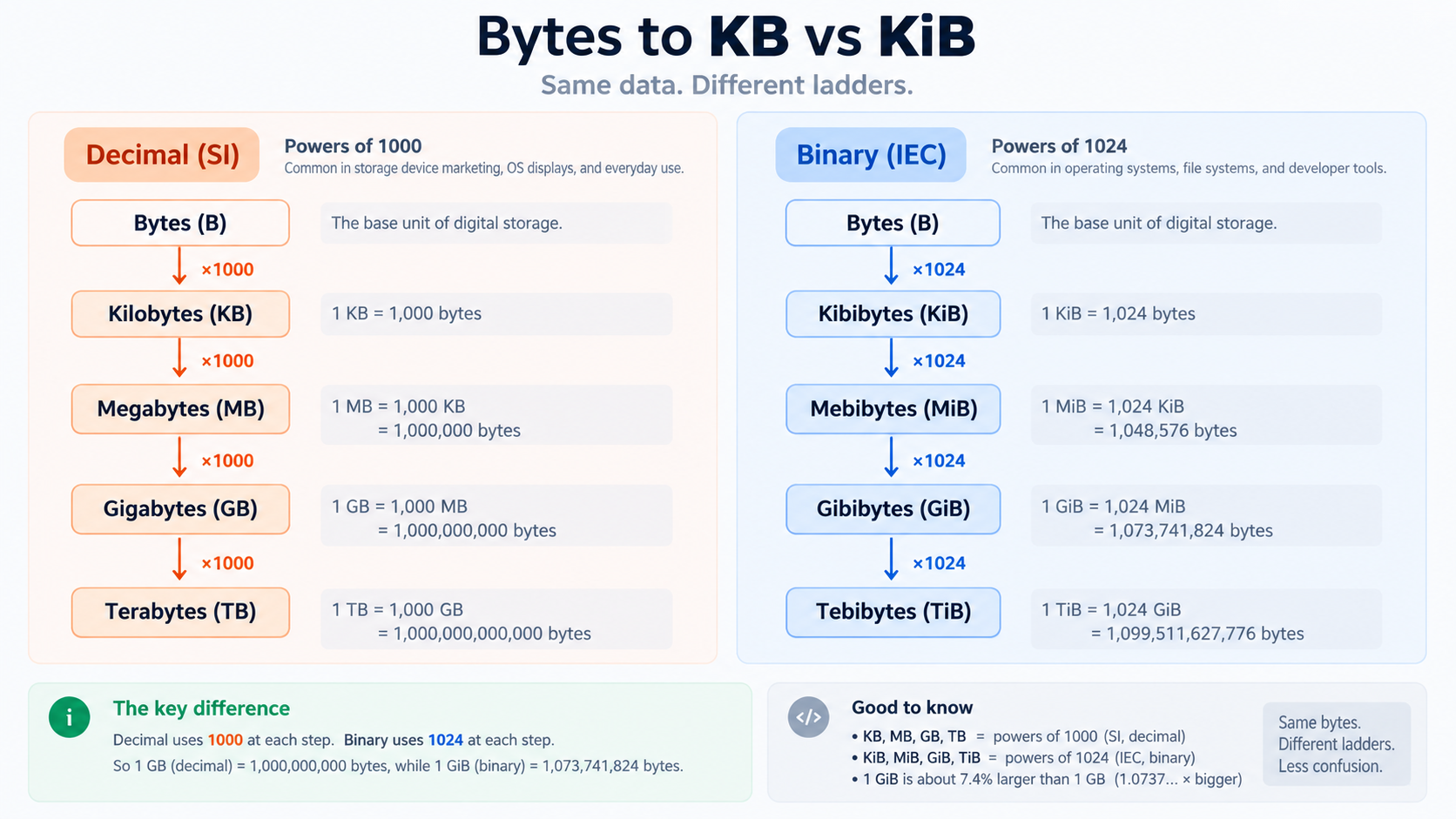
A byte is a byte, but larger unit labels have a history of mixed conventions. Decimal prefixes use powers of 1000, while binary prefixes such as KiB and MiB use powers of 1024. Confusing the two makes storage sizes look inconsistent even when no bytes are missing.
Decimal units
In SI-style decimal usage, 1 kB is 1,000 bytes, 1 MB is 1,000,000 bytes, and 1 GB is 1,000,000,000 bytes. Storage vendors commonly use decimal capacity.
Binary units
IEC binary prefixes make the 1024-based meaning explicit: 1 KiB = 1024 bytes, 1 MiB = 1024 KiB, and 1 GiB = 1024 MiB.
Why interfaces disagree
Some operating systems or applications historically display 1024-based values using labels such as KB/MB/GB, while others use decimal units or proper KiB/MiB/GiB labels. The numeric difference grows with larger sizes.
Convert from bytes when precision matters
If you know the exact byte count, use Byte Converter to calculate both decimal and binary representations. Include the unit label in reports instead of writing a naked number like “512 MB.”
Network speeds are another unit system
Bandwidth is often expressed in bits per second, such as Mbps, while file sizes are bytes. Eight bits equal one byte before protocol overhead and other real-world factors, so a “100 Mbps” connection does not imply 100 MB/s file transfers.
Compression changes bytes, not units
A compressed image can drop from several MB to hundreds of kB because the encoded byte count changed. Image Compressor helps reduce that count; unit conversion only changes how the same quantity is expressed.
FAQ
Is a megabyte always 1,000,000 bytes?
Under SI decimal prefixes, yes. In some software, “MB” has historically been used for 1,048,576 bytes, which is properly called 1 MiB.
Why does my storage device show less capacity?
One common factor is decimal vendor capacity being displayed using a binary-based convention. Formatting, partitions, filesystem metadata, and reserved space can also contribute.
Practical next step
Use Byte Converter and name the unit explicitly whenever the distinction affects limits, pricing, or capacity planning.