Base64 is a binary-to-text encoding, not a security feature. It represents arbitrary bytes using a restricted set of printable characters, which makes binary content easier to carry through text-oriented formats. That is why it appears in JSON payloads, MIME email, basic credentials, certificates, and data: URLs.
What Base64 changes
Base64 groups input bits and maps them to a 64-character alphabet. The familiar standard alphabet uses letters, digits, +, and /, with = padding in many encodings. Because six bits are represented by each Base64 character, encoded output is typically about one-third larger than the original binary data, before any additional transport overhead.
Encoding is not encryption
Anyone who has the Base64 text can normally decode it without a key. Do not use Base64 to hide passwords, API keys, personal data, or confidential documents. If data must be secret, use an appropriate encryption mechanism and secure transport. If you need to detect changes, use a hash or checksum instead; the Hash Generator is designed for that job.
Where Base64 is genuinely useful
Text-only containers. Some systems need binary data embedded inside JSON, XML, or another textual envelope.
Small inline web assets. A data: URL can include Base64-encoded image bytes. This can be convenient for small self-contained assets, though large embedded files increase document size.
Copying opaque bytes safely. Base64 avoids control characters that can be mangled by terminals, logs, or line-oriented systems.
Debugging API payloads. You may need to decode a field to confirm whether it contains the expected file or message.
Standard Base64 versus URL-safe Base64
Some protocols use a URL-safe variation that replaces characters that are awkward in URLs. JWT segments, for example, use Base64url conventions. Do not assume every Base64-looking string uses identical padding or alphabet rules. If a decoder rejects a token segment, the problem may be the variant rather than corrupted data.
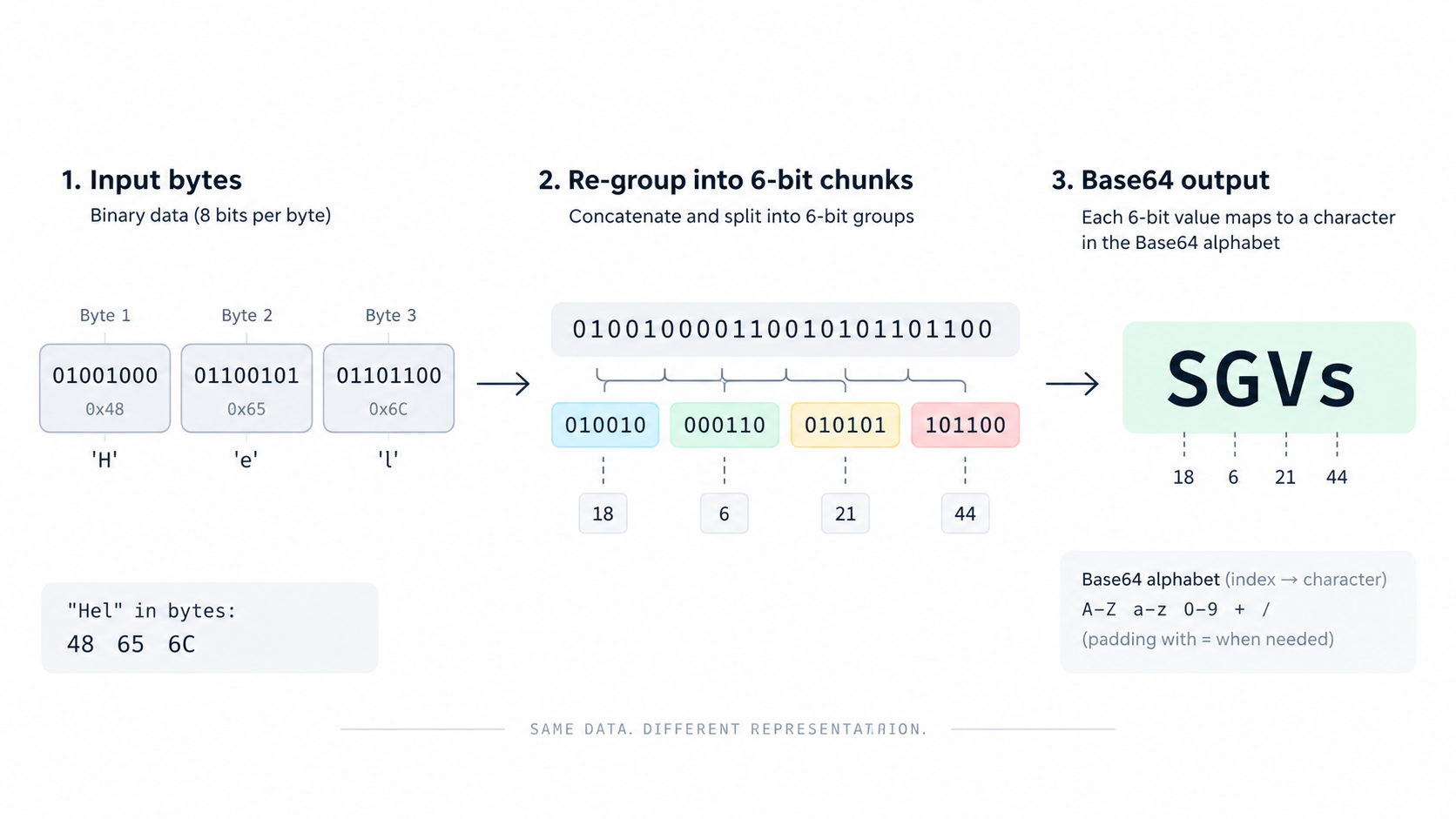
A practical encode/decode check
Take a short known string such as Hello. Encode it with the Base64 tool, then decode the result and verify you get the exact original bytes. For binary files, compare the reconstructed file with a checksum if exact byte identity matters. Base64 preserves bytes; text character-encoding mistakes can still happen before those bytes are encoded.
FAQ
Why does Base64 end with =?
Padding is used by many Base64 encodings when the input length does not divide evenly into complete groups. Some URL-safe formats omit padding.
Can I compress Base64 text to save space?
Usually compress the original data first, then Base64-encode only if the transport requires text. Encoding first tends to make compression less effective.
Practical next step
Use Base64 when the problem is representation, not secrecy. That distinction prevents a common class of design mistakes.